Showing posts with label AutoCAD. Show all posts

Sunday, May 03, 2026

Autodesk, AutoCAD, 3ds Max, Revit and Tokens

 I've been a user of Autodesk products for so many years, it's kinda embarrassing. I call myself an AutoCAD "Olde Fart" sometimes. I can remember when..... Well here goes something new, Tokens to use the program. Back in the day, you purchased the software, later to become known as a perpetual license. I seem to remember that this cost something like 3500 CDN$ back in 1985. Than small upgrade fees every so once in a while, 100 to 200 not that much more than that. The whole software industry worked like that. Then companies realized that this was not sustainable.

Then came subscriptions, annual and monthly. Choose between a higher price per month or a better deal if you commit to a full year. Now we have per day, usage tokens. I'm an architect, and over time I'm using these products less and less. I'm just not working as much. So what to do to use these programs in a cost effective fashion. Especially for a person like me that only uses them occasionally.

AutoCAD and Revit both have full versions and LT versions. 3ds Max only a full version. Oh and I forgot to mention the AEC Collection, the whole kit and kaboodle one price. and the AutoCAD/Revit LT Suite, Shish.  So here goes:

AutoCAD (3D Capabilities)

2900 CDN$/ Year

360 CDN$/ Month

29.05 CDN$/ Day (7 tokens at 4.15 per token)

AutoCAD LT

755 CDN$/ Year

95 CDN$/ Month

No Flex / Token version available

Revit

4160 CDN$/ Year

525 CDN$/ Month

41.15 CDN$/ Day (10 tokens at 4.15 per token)

Revit LT

770 CDN$/ Year

95 CDN$/ Month

No Flex / Token version available

AutoCAD/Revit LT Suite

945 CDN$/ Year

120 CDN$/ Month

No Flex / Token version available

3ds Max

2780 CDN$/ Year

350 CDN$/ Month

41.15 CDN$/ Day (6 tokens at 4.15 per token)

AEC Collection (AutoCAD, Revit, 3ds Max and a whole bunch of other software)

5085 CDN$/ Year

635 CDN$/ Month

No Flex / Token version available


WOW, I hope I have not lost you. So many options, depends on how much you are going to use the product or products. Given that I might use a program once a week, and even then perhaps not the same program, flex/tokens might be the route. 

Full version of AutoCAD = 29.05/day * 4 days per month = 116.2 per month

slightly more than paying for AutoCAD LT for 1 month.


Wednesday, October 25, 2023

AutoCAD Web and AutoCAD LT

 Seems like it's been a long time coming but here are 2 major developments to come out of Autodesk related to its flagship product AutoCAD. 

AutoCAD Web

AutoCAD Web

Honestly, I almost didn't even try this one. I looked over some of the material online and there was not enough to perk my interest. I did finally enroll in a 1 month test which cost a whole 15$ CDN. I was surprised at how easy it was to transition from my old ACAD habits to this product. Then the hey not bad wore off quickly. Copy and paste from one file to another was non existent. Blocks seemed to be constricted to one drawing (unless you setup a library in the desktop version) One file open at one time, and unfortunately slow. So back to AutoCAD LT for my 2D drafting needs.

AutoCAD LT & AutoLISP

Damn, Mabel they finally done it.! Yup AutoCAD LT finally includes the ability to load AutoLISP routines. Back in ummmm what was it now 1992 (or something).? when LT was first introduced it, was supposed to include LISP, and then the powers that be pulled it at the last minute. It was probably a good decision for Autodesk as many people rely on those LISP routines to make themselves truly productive. Well thank you Autodesk for finally giving the users that can't justify the cost of a full blown version of AutoCAD something we have needed for a while now.

Wednesday, January 19, 2022

Chapter 9 - Is Published..!

Unfortunately, I have been away and not able to work on my videos. So here finally is chapter 9. Chapter 9 covers how to setup a drawing onto a drawing sheet. I hope you like it.

Click Here to view the Video

Saturday, September 11, 2021

Chapter 8 is here

Chapter 8 is now available. This chapter covers how to create a symbols library for Architectural Drawings using AutoCAD LT 2022.

To view the video click here:


Wednesday, September 08, 2021

Chapter 7 complete - Chapter 8 coming soon

Continuing with my video series, Creating Architectural Drawings using AutoCAD LT, I have just finished chapter 7, which covers editing objects, creating one drawing from another. 

To view the video Click Here:

Thursday, August 12, 2021

Architectural Drawings with AutoCAD LT 2022

 I created a few new chapters in my video series.


To access chapter 05 Click here.

To access chapter 06 Click here.


Thursday, July 29, 2021

Creating a 3D Roof in AutoCAD

 I made a few new videos to create a 3D roof in AutoCAD. You can get some excellent results when you model in AutoCAD. Have a look at the following:


Video Part 1

Part 1 - Creates a simple roof with a layer to receive a shingle finish.

Video Part 2

Part 2 - Creates a more complex geometrical finish to represent a standing seam roof.


Tuesday, July 13, 2021

Architectural CAD with AutoCAD LT 2022 - Chapter 04

Here is a new chapter in a series I am creating for AutoCAD. In this chapter you will draw a small building module and learn how to use drawing and construction commands. You will also be introduced to layers and see how to transfer elements from one drawing to another.


You can view the video by clicking here. I hope you enjoy it.

Saturday, June 05, 2021

New Videos and Book - Architectural Drawings with AutoCAD LT 2022

 I hope, over the next few months, create a few new videos on creating architectural drawings using AutoCAD LT 2022. Eventually I'd like to get this all down in print. Here is the link to the video. Hope you like it. More to come.

Wednesday, April 03, 2019

TV Stand AutoCAD Block to Revit Family

In order to illustrate how to use an AutoCAD entourage element in Revit, today we took a simple AutoCAD block and converted it into a Revit Family. Naturally, the resulting Revit family had no paramerters, none the less it is good for objects which have fixed sized. Not everything needs to flex you know.

Here is the object as it appeared in AutoCAD.

Once we imported it, and added materials in Revit.

The AutoCAD file can be downloaded here.

The Revit family can be downloaded here.

Hope you like them, cheers

Thursday, August 30, 2018

New course at Seminaire de Sherbrooke

This month I started a new course at the Seminaire de Sherbrooke. I be teaching a workshop course where students are expected to produce construction drawings for a building which contains a steel structure. I'll give you updates along the way.


Saturday, February 17, 2018

Creating a simple 3D Model

I stepped through modeling a simple 3D model of a elbow pipe fitting with my students in AutoCAD. Thought I would write it up and post it. Download the document here

Thursday, December 07, 2017

Creating Dimension Tags

Annotation Tags have always given my students a bit of difficulty. I've put a series of instructions in a document. I hope to create a video of it soon.

Here is the document

Friday, November 24, 2017

Dimension Layer Setting


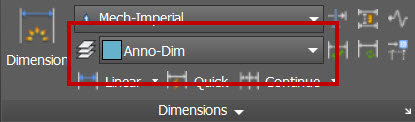
This is nice, the ability to set a dimension layer in AutoCAD. Once set, your dimensions automatically go to that layer, ignoring the current layer.

Wednesday, September 30, 2015

Images from students from my recent Vanier College group

Student: Mohammed Lofti Maghaddam, Modeling: Autodesk Revit Rendering: Autodesk 3ds Max
 
Student: Alireza Babaeimanesh, Modeling: Autodesk Revit Rendering: Autodesk 3ds Max

Thursday, August 13, 2015

It's published..!


My first course with Digital Tutors has recently been published. To go to the course click the link below:

Modeling Residential Exteriors in AutoCAD

Thursday, November 13, 2014

More student work from Vanier CAD AEC Program

Some more work from the Vanier CAD AEC Program. I think that Chris Zsofcsin was partially obsessed by Star Wars. Good work Chris...

Wednesday, October 29, 2014

Student work from Vanier CAD AEC Program

Lately, I've been teaching in the Vanier CAD AEC program to Adult learners. The program is getting more interesting as we integrate teaching 3ds Max into the program. In our last group of students who graduated in September 2014, we had a number of really interesting projects. I thought I would feature them one at a time on these pages. The first one I would like to feature is Sonila Thaka. She worked on 2D drawings and a 3D model and renderings for a 2 story cottage. Pictured below are her exterior and interior renderings. Awesome..!

Tuesday, October 28, 2014

Standards, Standards, Standards

I'm starting today a topic in my class which I have always believed is the single most important thing in a CAD environment, standards. Why is it so important? Because it gives us all a common basis to understand drawings and models. If we don't have standards we don't have a common language. While it is true that we have many languages in the world, we also have many people who speak the same language. So when I say Exterior Wall, most people who speak English know what I'm talking about. If I was to show you a drawing with a layer called A-WALL-EXT, most people who work in the building industry with computers should know what that layer is used for. If we don't have standards in our work group, then we don't have a common language. Imagine what would happen in a team of people working on architectural drawings if the CAD operators were each using a different layer for the exterior walls of a building. Standards, once you have learned the basics, this is the next step.

Thursday, July 10, 2014

Update to Window AutoLisp

I've noticed that many people have been downloading the window lisp routing I created for AutoCAD. I hope that those people are finding it useful. I decided to add a few new features that will make the windows more attractive.

To download the new updated command click here

The original window is described on the following page:

Before getting started, as with the original window, you must place the UCS to be parallel to the face of the wall, positive x pointing to the right, and positive y pointing up, positive z pointing away from the screen.

First, a routine called mullion to add horizontal and vertical mullions to the outside of the window. Once a window is created, you can type Mullion at the command prompt, and you will be prompted for a lower left corner, then upper right corner of the window. These should be placed on the part of the frame just outside of the glass.


Then when prompted indicate the number of horizontal and vertical mullions.


The second new feature is to create an open curtain inside the window. This works much the same way as previous commands. simply pick 2 points to indicate the lower left, then upper right. In this case the points should be on the inside of the window frame.


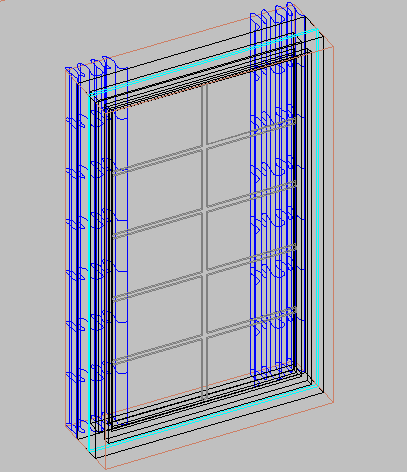
The end result should look as follows.