Tuesday, February 06, 2024

Converting Metres to Feet and Fractional Inches in Construction

 Have you ever wondered about converting Metric and Imperial units. In some cases it's pretty easy. You can even use an online converter. Other times it's a pain. Say you have a measurement in metres and then you need to convert that into feet and inches and even worse, fractional inches. So let's say we start with a measurement like 9.45m how many feet, inches and fractional inches are in that value.

1/ First step, the easy one, is to convert to decimal feet. (3.2808 is the number of feet in a metre.)

9.45m x 3.2808 = 31.10236 ft

That you can do on a calculator, or using an online converter.

2/ Second, is you want to take the remainder and convert that into decimal inches. At this point our decimal is in feet so we are going to convert decimal feet into decimal inches. (12 is the number of inches in a foot)

0.10236 ft x 12 = 1.22832 in

3/ Third step is to convert the decimal inches into fractional inches. Before you do that you have to ask yourself how you are going to use this measurement. If you are going to use this outdoors in some sort of landscaping then you might just round off the inch value to the closest inch, in this case 1". But say you need this value to the closest 1/8" for some application on the inside of a building. Again we will use the remainder and multiply it by 8/8. (8/8 is equal to 1 so you are not changing the value, just how it appears.)

0.22832 x 8/8 = 1.82656/8 

4/ Fourth, we will do some rounding and reduction. 

round 1.82656/8 to 2

our fraction now appears as follows 2/8

which we reduce to 1/4

5/ Finally, we combine everything together.

31' - 1 1/4"

Try a few on your own.


Saturday, October 28, 2023

The 900


A new addition to the modular manufactured home series which I have been developing, This one I called "The 900". It is a 2 story construct, which would require building 2 elements in the factory and assembly on site. The advantages would include; two bedrooms, a second washroom. The staircase does take away space but some could be recuperated underneath via the washroom or hallway.


Wednesday, October 25, 2023

AutoCAD Web and AutoCAD LT

 Seems like it's been a long time coming but here are 2 major developments to come out of Autodesk related to its flagship product AutoCAD. 

AutoCAD Web

AutoCAD Web

Honestly, I almost didn't even try this one. I looked over some of the material online and there was not enough to perk my interest. I did finally enroll in a 1 month test which cost a whole 15$ CDN. I was surprised at how easy it was to transition from my old ACAD habits to this product. Then the hey not bad wore off quickly. Copy and paste from one file to another was non existent. Blocks seemed to be constricted to one drawing (unless you setup a library in the desktop version) One file open at one time, and unfortunately slow. So back to AutoCAD LT for my 2D drafting needs.

AutoCAD LT & AutoLISP

Damn, Mabel they finally done it.! Yup AutoCAD LT finally includes the ability to load AutoLISP routines. Back in ummmm what was it now 1992 (or something).? when LT was first introduced it, was supposed to include LISP, and then the powers that be pulled it at the last minute. It was probably a good decision for Autodesk as many people rely on those LISP routines to make themselves truly productive. Well thank you Autodesk for finally giving the users that can't justify the cost of a full blown version of AutoCAD something we have needed for a while now.

Thursday, October 19, 2023

The 600


 "The 600" is an adaptation of the 450 with the simple addition of a module to the left of the entrance. The design gives a l-shaped layout surrounding a court garden. Spacious interior, despite it's small square footage.

Sunday, September 17, 2023

The 450


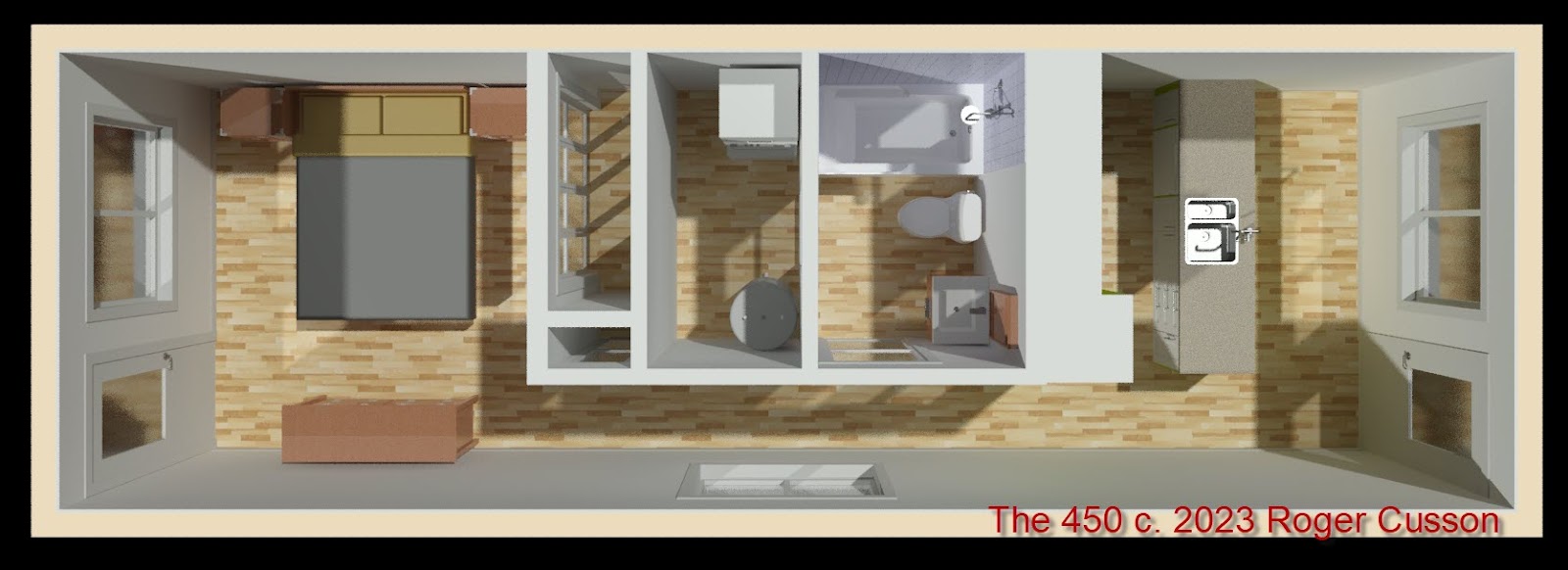
I'm calling it "The 450" because that is the approximate size of the structure. (450 sq. ft.) It's a tiny home which features regular sized rooms, appliances etc. I'm working on units from a cabin "The 100" right up to a 2 story, double width unit "The 1050".

Friday, March 31, 2023

Celebrating 2 years on Vancouver Island


Images of buildings and landscapes on Vancouver Island. click here.

Wednesday, January 19, 2022

Chapter 9 - Is Published..!

Unfortunately, I have been away and not able to work on my videos. So here finally is chapter 9. Chapter 9 covers how to setup a drawing onto a drawing sheet. I hope you like it.

Click Here to view the Video

Saturday, September 11, 2021

Chapter 8 is here

Chapter 8 is now available. This chapter covers how to create a symbols library for Architectural Drawings using AutoCAD LT 2022.

To view the video click here:


Wednesday, September 08, 2021

Chapter 7 complete - Chapter 8 coming soon

Continuing with my video series, Creating Architectural Drawings using AutoCAD LT, I have just finished chapter 7, which covers editing objects, creating one drawing from another. 

To view the video Click Here:

Thursday, August 12, 2021

Architectural Drawings with AutoCAD LT 2022

 I created a few new chapters in my video series.


To access chapter 05 Click here.

To access chapter 06 Click here.


Thursday, July 29, 2021

Creating a 3D Roof in AutoCAD

 I made a few new videos to create a 3D roof in AutoCAD. You can get some excellent results when you model in AutoCAD. Have a look at the following:


Video Part 1

Part 1 - Creates a simple roof with a layer to receive a shingle finish.

Video Part 2

Part 2 - Creates a more complex geometrical finish to represent a standing seam roof.


Tuesday, July 13, 2021

Architectural CAD with AutoCAD LT 2022 - Chapter 04

Here is a new chapter in a series I am creating for AutoCAD. In this chapter you will draw a small building module and learn how to use drawing and construction commands. You will also be introduced to layers and see how to transfer elements from one drawing to another.


You can view the video by clicking here. I hope you enjoy it.

Monday, June 07, 2021

Another Video - This one for Revit LT 2022


Since I have some recent new content from a Revit introductory course. I thought while I'm creating videos, I might as well create some videos from that content. So here is part 1 of the chapter entitled "Starting a New Project". Click Here to start the video.

Saturday, June 05, 2021

New Videos and Book - Architectural Drawings with AutoCAD LT 2022

 I hope, over the next few months, create a few new videos on creating architectural drawings using AutoCAD LT 2022. Eventually I'd like to get this all down in print. Here is the link to the video. Hope you like it. More to come.

Friday, May 15, 2020

Modeling a Chair in 3ds Max

Created a video tutorial about modeling a chair in 3ds max. Here is the link to the video. I hope you enjoy it.


Wednesday, May 13, 2020

Work in a 3ds max class.

Although not a final polished image. Thought I would share some of the tings we are covering in one of my classes. Opacity maps, creating a background image/cutout, foliage, entourage objects (man/car).


Wednesday, January 08, 2020

For People who missed the first class of Introductory Revit

New Introductory tutorial on Revit. It's really basic, just meant to get people started (especially those that missed the first class) :-) LOL. Click Here to access the online tutorial

Wednesday, April 03, 2019

TV Stand AutoCAD Block to Revit Family

In order to illustrate how to use an AutoCAD entourage element in Revit, today we took a simple AutoCAD block and converted it into a Revit Family. Naturally, the resulting Revit family had no paramerters, none the less it is good for objects which have fixed sized. Not everything needs to flex you know.

Here is the object as it appeared in AutoCAD.

Once we imported it, and added materials in Revit.

The AutoCAD file can be downloaded here.

The Revit family can be downloaded here.

Hope you like them, cheers

Thursday, March 28, 2019

Window Uneven Panel Revit Family

In class this week we went over how to create a window family. The project we are working on has an uneven panel window. Looking back I found another version that I made a few years ago. If you like download the 2 versions and hopefully you will like one or the other.

You can download the 2016 version here

The 2018 version is available here

Enjoy.

Thursday, January 31, 2019

Renders in Revit, Enscape and 3ds Max (ART renderer)

Here are some comparative rendered images I created, The original model and first render is in Revit. The second is in 3ds Max using the ART renderer which was introduced in 2017, and the final one was from Enscape which I tested in the fall of 2018
Original Image rendered in Revit. All materials are created in Revit.
Imported Linked into 3ds Max 2017 and using the new ART Renderer. Note loss of entourage elements and sky background.
Enscape render which works as a plugin to Revit. Entourage elements conserved and note enhancement of grass material.